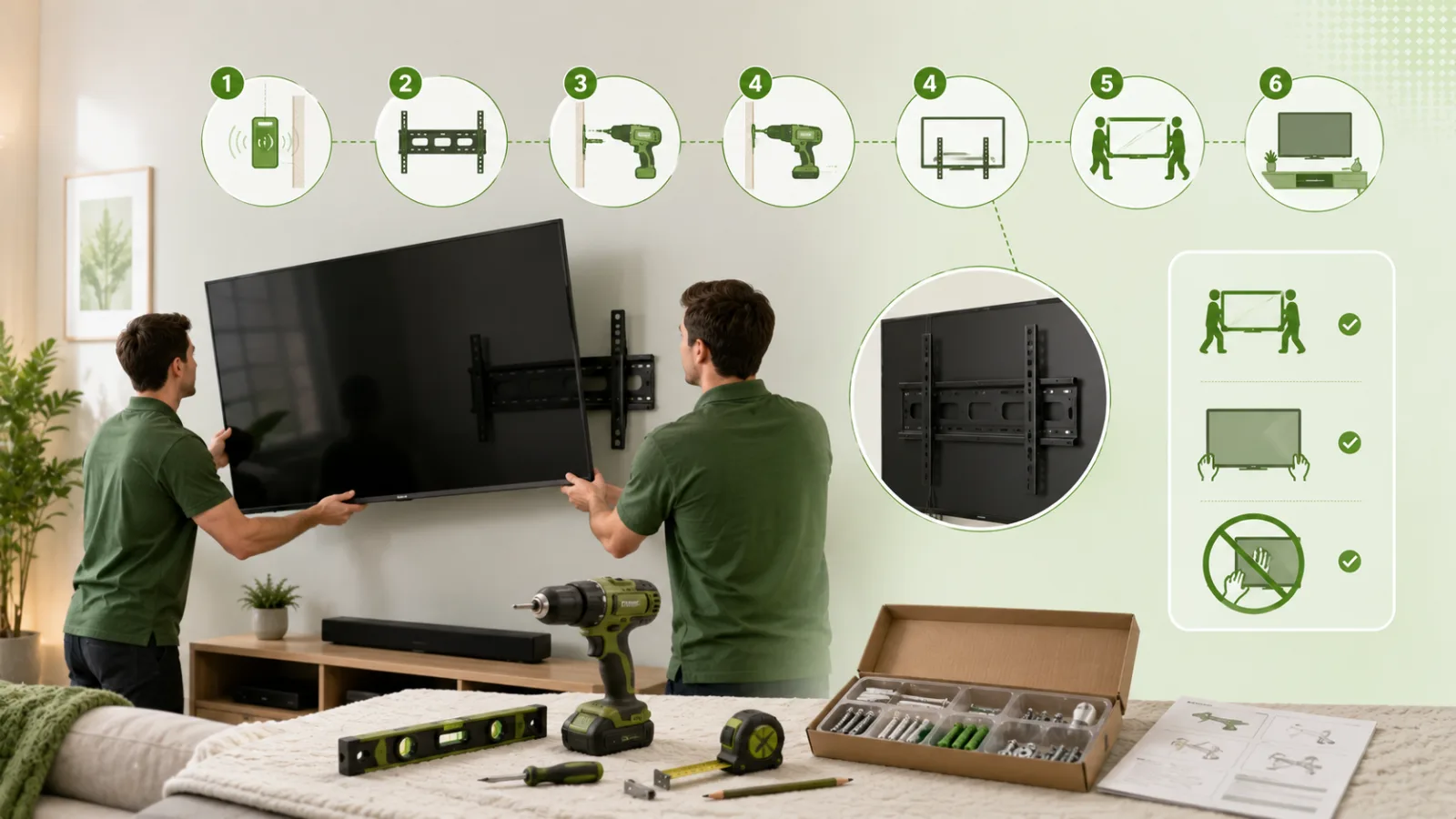
Mounting a TV is genuinely a two-person, ninety-minute job on a normal stud wall — and genuinely not a DIY job on several other kinds of wall. Knowing which one you have is most of the decision.
Before you buy anything: check the VESA pattern
On the back of the TV there are four threaded holes in a rectangle. The distance between them in millimetres, horizontally by vertically, is the VESA pattern — 200×200, 400×400, 600×400 and so on. Your bracket must support that pattern and your TV's weight.
Also check the screw length. Too short and you have barely any thread engaged; too long and on some sets you can damage the panel behind the mounting boss. Most brackets ship with an assortment; use the shortest that engages fully.
Choose the right bracket
- Fixed — sits closest to the wall, cheapest, no adjustment. Fine when you always watch from the same place and the cables are already accessible.
- Tilting — a few degrees of downward tilt. The right default if the TV goes above eye level.
- Full-motion / articulating — swings out and rotates. Best for corners, kitchens and rooms with seating at two angles. Costs more, sticks out further, and puts far more leverage on the wall fixings, so anchoring matters more.
Height: get this right the first time
The most common mistake by a distance is mounting too high. Over-the-fireplace installations look great in photographs and give people neck ache in real life.
The rule: the centre of the screen should be at seated eye level, which for most people on a normal sofa is 40–45 inches from the floor. On a 55-inch TV that usually puts the bottom edge around 25 inches up.
Before drilling anything, cut a piece of cardboard the size of the screen and tape it to the wall. Sit down. Look at it. Live with it for an evening.
Finding the studs
A TV must be anchored into structure, not into drywall alone.
- Use a stud finder, then confirm by hand — knock along the wall and listen for the change from hollow to solid.
- Studs are usually 16 inches apart, occasionally 24. Once you find one, measure to predict the next.
- Confirm with a small finishing nail near where the bracket will cover it. It costs you a pinhole that the bracket hides and it tells you the truth, which the stud finder sometimes does not.
- Mark the centre of each stud. A lag bolt near the edge of a stud has far less holding power.
Doing it
- Attach the arms or plate to the TV first, on a soft surface, screen down.
- Hold the wall plate up, level it properly with a spirit level — do not trust your eye — and mark the holes.
- Drill pilot holes into the stud centres, sized for the lag bolts supplied.
- Bolt the plate up and check level again before it is fully tightened.
- Have a second person help lift the TV onto the plate. This is the step where screens get cracked, and a 65-inch TV is more awkward than it is heavy.
- Connect everything before you push it flat, and check the picture before tidying up.
The walls where you should stop and call somebody
Brick, concrete or stone. Different drill, different anchors, and getting it wrong means either a bracket that will not hold or a badly damaged wall.
Tile. Cracking a tile is easy and replacing one in an existing wall is often impossible to match.
Plaster and lath in older houses. It crumbles, and what is behind it varies wildly.
Metal studs. Common in apartments and commercial conversions. They need specific toggle fixings; standard lag bolts will pull straight out.
No stud where you need one. Sometimes the only place the TV can go has no stud behind it. There are solutions — a plywood cleat spanning two studs, or heavy-duty toggles rated for the load — but this is where amateur installs fail.
Hiding the cables
Two legitimate options.
Surface trunking — a slim painted channel down the wall. Works on any wall, takes twenty minutes, and is much less noticeable painted to match than people expect.
In-wall routing — cables run inside the cavity for an invisible finish. Straightforward on a stud wall. One rule: an ordinary power cord must not simply be buried inside a wall. Use a proper recessed power kit, which provides a code-compliant outlet behind the TV.
What it costs to have done
TV mounting typically runs $80–$200 per TV, including cable management, and takes one to two hours. Screen size, wall type and whether the cables are hidden are what move it. Ask whether the bracket is included — some pros supply it, some fit the one you bought, and it is the most common surprise on the invoice.
Rather not risk the screen? See the pros listed near you with their published prices, or leave your email to hear the day one joins: TV mounting near you →
While somebody is there with a drill and a stud finder, it is worth having the shelves and mirrors done too — the call-out is the bulk of the cost of a single job: shelf and picture hanging →